




Every month, 18,100 people in the US search for “best CRM for small businesses with remote sales teams” (Semrush, October 2026). The phrase is long, which tells you it is typed by someone with a real problem, not someone browsing. I have been in that search twice, once as the owner of a small agency and once helping a client pick a tool for five people in three time zones. Both times, the lists I found ranked CRMs by features. Neither time did a feature list predict which tool the team would still be using six months later.
This is the version I wish I had read: what a remote sales team actually breaks in a CRM, what the ten most common affordable tools cost once you count real users, and a short test you can run in an afternoon before you commit. All prices were checked on the vendors’ own pricing pages on 5 October 2026, in US dollars, billed yearly unless noted.
What “remote” changes about a CRM
A sales team in one office shares a CRM the way it shares a kitchen: someone shouts across the room when a lead comes in. A remote team has no room. That turns three ordinary CRM weaknesses into daily failures.
Nobody owns the first reply. When a lead arrives by website chat at 11 p.m. in one rep’s time zone and 8 a.m. in another’s, the CRM has to assign it, or both reps assume the other one has it. Gartner forecast back in 2020 that 80% of B2B sales interactions between suppliers and buyers would happen in digital channels by 2025, and for small companies that is now simply the inbox: chat, email, WhatsApp, Instagram, Telegram. Each channel that lives outside the CRM is a place where a lead can wait unanswered.
Context lives in people’s heads. In an office, a rep hands a deal to a colleague by walking over. Remote, the handover is whatever is written down. If the CRM only stores a contact and a deal stage, the second rep opens the record and sees a name, a phone number and nothing about the three messages that came in last night.
The bill scales with the headcount, not the work. Remote teams tend to be small and spread out: an owner, two or three reps, someone on support, a part-timer. Per-user pricing punishes exactly that shape.
So the question is not “which CRM has the most integrations”. It is: does the tool answer the customer when nobody on the team is awake, does it keep the whole conversation in one place, and what does it cost for the five people who will actually log in.
What five remote users really pay
Here is the same five-person team on the cheapest suitable plan of ten popular CRMs. “Suitable” means a pipeline, shared contacts and some way to capture leads from the website, because a contact list without lead capture is a spreadsheet with a login.
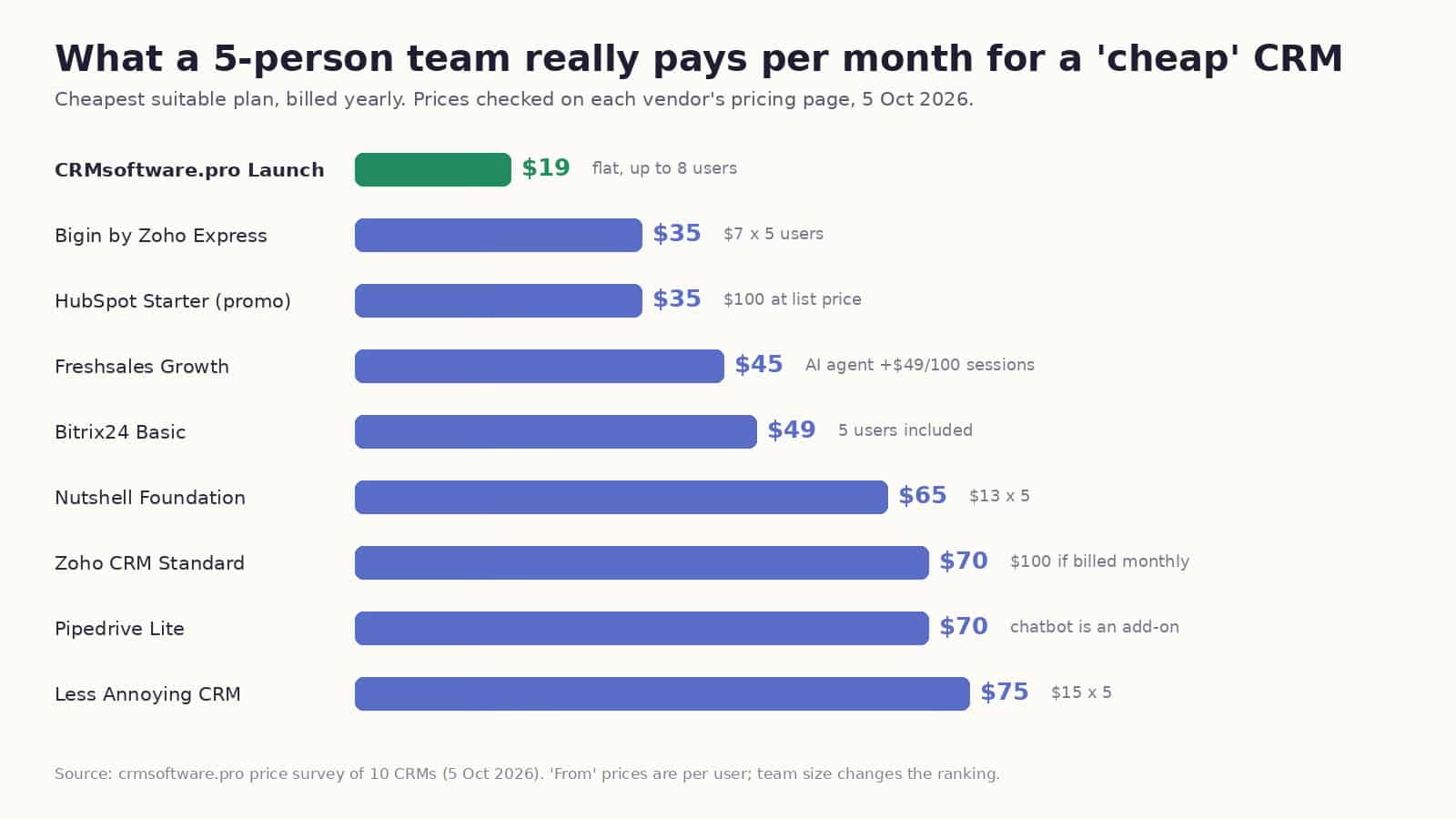
What a 5-person team pays per month on each CRM’s cheapest suitable plan, billed yearly, October 2026
| CRM and plan | 5 users, per month | What to know for a remote team |
| CRMsoftware.pro Launch | $19 | Flat price up to 8 users; AI agent answers website, email, WhatsApp, Slack, Telegram; 1,000 AI messages included |
| Bigin by Zoho Express | $35 | $7 per user; simple pipeline; little for inbound conversations |
| HubSpot Starter | $35 on a limited-time offer | $100 at list; Big marketplace; AI runs on credits; free plan caps at 2 users |
| Freshsales Growth | $45 | Phone, email, and chat built in; AI agent is $49 per 100 sessions extra |
| Bitrix24 Basic | $49 | Flat for 5 users; CRM plus tasks and chat; WhatsApp from Basic |
| Nutshell Foundation | $65 | $13 per user; web chat and AI chatbot on every plan; free live support |
| Zoho CRM Standard | $70 | $14 per user yearly, $20 monthly; deep customisation, longer setup |
| Pipedrive Lite | $70 | Best visual pipeline; chatbot and web forms are an add-on |
| Less Annoying CRM | $75 | $15 per user; very simple; no AI or live chat on the pricing page |
| Brevo Sales Essentials | $31 for 1 seat | Email marketing first; extra seat price not published |
The spread is $19 to $100 for the same five people. Notice how the order changes once you count users: the tool with the lowest per-user price (Bigin) ends up third, and the two flat-price tools (CRMsoftware.pro, Bitrix24) look expensive on a one-person test and cheap the moment there is a team.
Two notes on fairness. The company I work with makes CRMsoftware.pro, so it sits at the top of that table and you should weigh that. The prices are still the vendors’ own, and the full comparison with pros and cons for each tool is in the guide to the best affordable CRM for small business, where the ranking is explained line by line.
A real remote team: 18 boats, 600 conversations a day
The example that changed how I think about this is not a software company. DanEri Yachts runs 18 boats and talks to roughly 600 customers a day. Before anyone books, they ask about routes, prices, children on board, weather, availability, and payment, in several languages, at every hour. A single customer might start on the website, send a voice note on WhatsApp, follow up on Telegram, and then email a document. The team that answers is small and not in one place.
They started on a free CRM plan. Today an AI agent inside the CRM handles about 80% of those conversations in roughly two seconds, creates the contact and the deal, and hands the rest to a person with the whole thread attached. The company reports selling about 70% more, mostly because the answer arrived while the visitor was still ready to book. Your numbers will differ. The mechanism is the point: for a distributed team, the first reply is the product, and the CRM either does it, or it doesn’t.
The afternoon test
You can run this before signing up for anything. It takes about two hours and a notebook.
- Pull ten real conversations from the last month. Include a quiet lead, a high-value lead, a weekend question, a WhatsApp chat and one request that needed a second person. For each, write down the first reply time, who owned it, whether it was handed over and what happened next. This list is your test data for every CRM trial.
- Count the people who will log in. Everyone who replies to a customer or needs to see the history. Use that number, not “from $7”, on every pricing page.
- List the channels those ten conversations arrived through. If the top two channels are not included on the plan you can afford, the CRM will need an add-on, and the add-on is where the price doubles.
- Check four things on the cheapest tier: one shared history across channels; an automatic first reply with a clear handover to a human; owners, notes and tasks on every record; and a report that shows replies, qualified leads and revenue by rep.
- Price the whole thing: users times price, plus every add-on you circled, plus the monthly rate if you will not commit to a year. Compare three vendors, not ten.
- Paste the ten conversations into the trial. Not sample data. Watch which tool makes the next step obvious to a rep who was not in the original conversation.
If a tool fails step 4 on the plan you can afford, it is not the best CRM for a remote team no matter what the feature grid says.
Three things that look like features but are really remote-team insurance
Flat pricing. When a new rep joins in another country, the question “do we pay for another seat” should not exist. Flat plans remove a conversation that remote teams have more often than office teams.
A shared inbox that is the CRM. Not an integration with an inbox, the inbox itself. The moment the conversation lives in a separate tool, the handover note is a copy-paste, and copy-pastes are where context dies.
AI that is included, not metered. Credits, sessions and “outcomes” all mean the automatic reply costs extra once you rely on it. For a team that is asleep when the lead arrives, relying on it is the whole plan. If your leads mostly start as a chat or a message rather than a form, look at CRM software for small business that includes the AI agent and the users in one price, and check what happens at the message limit before you sign.
Conclusion
The best CRM for a small business with a remote sales team is not the one with the longest feature list. It is the one that answers the customer at 11 p.m., shows the next rep the whole thread, and costs the same whether the team is in one city or five. Count the users, count the channels, run the ten-conversation test, and the choice usually makes itself.
Data in this post: vendor pricing pages checked 5 October 2026 (CRMsoftware.pro, Bigin by Zoho, Freshsales, Zoho CRM, HubSpot, Pipedrive, Less Annoying CRM, Nutshell, Bitrix24, Brevo); Semrush Keyword Magic Tool, US database, 15 October 2026; Gartner press release, 15 September 2020; DanEri Yachts figures as reported by the company to CRMsoftware.pro.